
Selora AI v0.5.0: OAuth, MCP Tokens, and 1-Click Install
Selora AI v0.5.0 is our biggest release yet — OAuth 2.0 for MCP, dedicated MCP tokens, LLM feedback from suggestions, 1-click install for Selora Homes customers, and easier HACS onboarding.
Selora AI v0.5.0 is out, and it’s our biggest release to date. This one touches security, onboarding, and the feedback loop that makes Selora AI smarter over time. Here’s everything that shipped.
OAuth 2.0 for MCP
The MCP server now supports OAuth 2.0 authentication via Selora Connect. Instead of passing long-lived Home Assistant tokens — which grant full access to your entire HA instance — you can now authenticate through a secure browser-based OAuth flow scoped specifically to MCP.
Long-lived HA tokens are powerful and dangerous if leaked — they grant full access to your entire Home Assistant instance. OAuth eliminates that risk: no tokens to store, no secrets to rotate, and access is limited to what Selora AI actually needs.
Selora Hub users get this automatically — your MCP URL already works with OAuth out of the box. Non-Selora Hub users can enable Selora Connect in the integration settings to get the same secure flow.
Full setup details are in the updated MCP documentation .
MCP Tokens
Not every setup supports OAuth. For those cases, v0.5.0 introduces Selora AI Tokens — dedicated tokens scoped exclusively to the MCP server.
Unlike HA long-lived tokens, Selora AI Tokens:
- Only grant access to MCP — they can’t control the rest of Home Assistant
- Support granular permissions — read-only, admin, or custom per-tool
- Can have an expiration — no more tokens that live forever
Create them in the Selora AI settings panel under Remote Access & MCP Authentication. See the MCP Tokens documentation for details.
Suggestions as LLM Feedback
When Selora AI proposes an automation, you can accept or decline it. Starting with v0.5.0, those decisions are fed back to the LLM as context for future suggestions. Accept a pattern, and Selora AI learns to propose more like it. Decline one, and it adjusts.
This is the beginning of a personalized feedback loop — the more you interact with suggestions, the more relevant they become for your specific home.
1-Click Install for Selora Homes Customers
If you’re a Selora Homes customer, getting started with Selora AI is now a single click. Log in to Connect , navigate to your installation, and toggle Selora AI on.
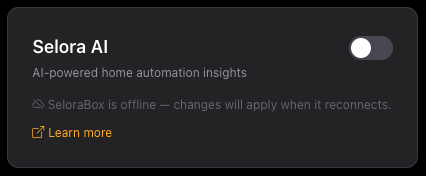
That’s it. Connect handles everything: HACS installation, integration setup, and automatic provisioning of OAuth keys for MCP. No manual configuration, no tokens to copy — your MCP endpoint is live and secured from the moment you flip the switch.
Easier Install for HACS Users
For Home Assistant users who already have HACS installed, onboarding is now simpler. Click the button below to add Selora AI directly to your HACS instance:

After installing and restarting, Selora AI appears in the sidebar and you’re ready to go. Full installation instructions are in the installation guide .
Bug Fixes
This release also includes a batch of bug fixes across the integration, improving reliability for automation generation, panel synchronization, and MCP transport handling. See the full milestone for the complete list.
What’s Ahead
v0.5.0 is a showcase of where we’re going with Selora AI — a secure, intelligent, and effortless way to manage your smart home. Here’s what’s coming next:
- Selora AI Cloud : our own LLM backend that removes the need to bring your own API key. A true turn-key experience that will dramatically simplify onboarding.
- Delayed actions via chat : ask Selora AI to do something later — “turn off the lights in 30 minutes” or “arm the alarm at 11pm.”
- Scene creation : describe the ambiance you want and let Selora AI build the scene for you.
- Custom models: in the background, we’re training lightweight models tailored specifically for Home Assistant — smaller, faster, and purpose-built for smart home control.
We announced v0.5.0 on Reddit — come say hi and let us know what you think.