
Selora AI v0.16.0: Build and Reshape Home Assistant Dashboards by Asking
Selora AI v0.16.0 creates, fills, and rearranges Home Assistant dashboards from chat, organises floors, areas, labels, and scripts on request, and validates automations against Home Assistant's own rules before saving so nothing is written broken.
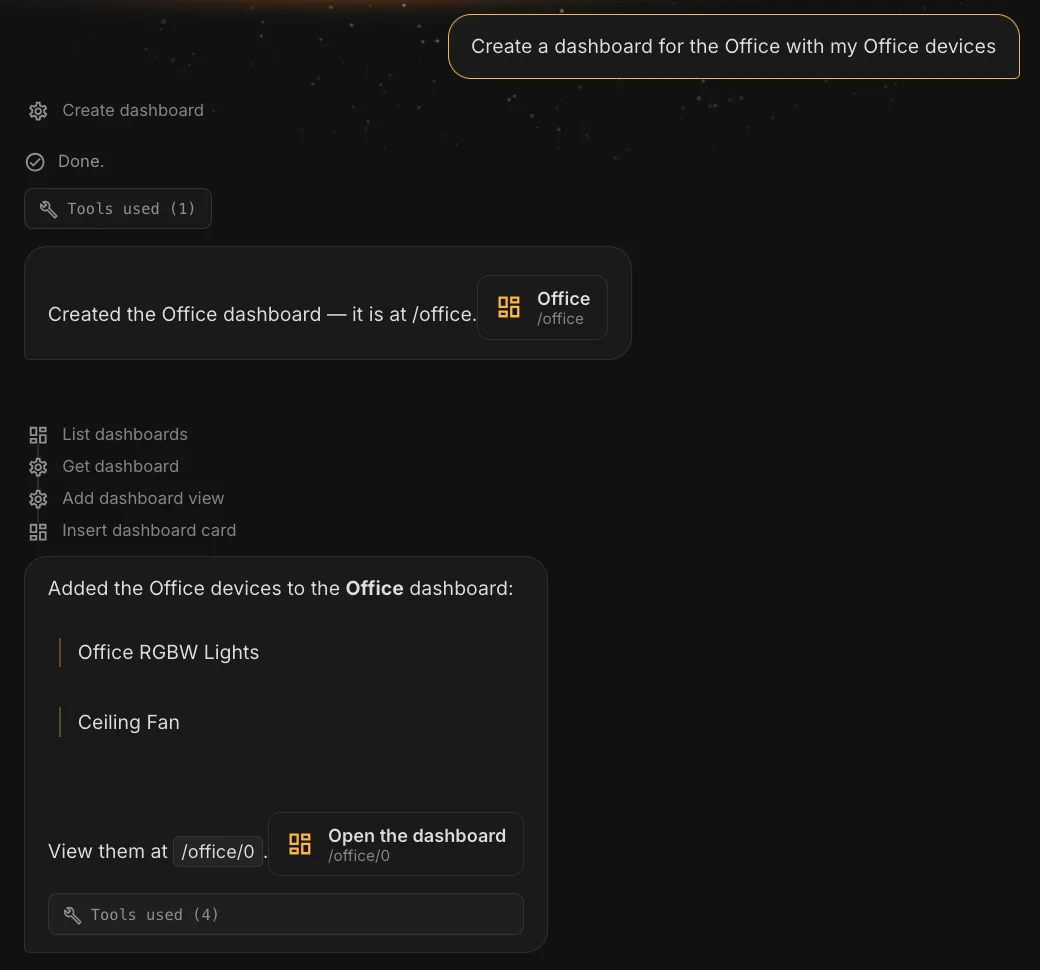
Selora AI v0.16.0 is the dashboard release. Ask for a dashboard and you get one, filled with the right devices, laid out the way you describe. Then reshape it by asking again. Alongside that, Selora AI can now organise the structure of your home from chat, and it no longer lets an automation reach disk that Home Assistant would refuse to run.
Ask for a dashboard and get one
“Create an Office dashboard with my office devices.” That now produces a real dashboard, with a page, populated with the devices that belong there. Creating and deleting a dashboard both go through a confirmation card first, so nothing appears or disappears without you saying so.

Building the dashboard was never the hard part. Keeping it tidy was.
Reshape it by asking
Once a dashboard exists, you describe changes rather than dragging things around:
- Pages. Add, rename, and remove them.
- Cards. Place, replace, and remove them.
- Layout. “Keep the garage door at the top.” “Put these three side by side.”
- Moves. Between pages and between dashboards, several at once, as in “move all the media to the Entertainment page.”
Cards are moved as-is. Whatever you configured on a card travels with it, so nothing you set up by hand gets silently retyped or lost.
Every dashboard edit finishes with a link for each page it touched, so you can go and look at the result instead of hunting for it.
Organise your home from chat
Floors, areas, categories, labels, and scripts can all be created, renamed, and reorganised from the conversation. “Move the lamp to the Study.” “Label everything battery-powered.”
This is the unglamorous work that makes everything else behave: an automation that targets a well-organised home is shorter, clearer, and easier to change later.
Recipes benefit too. An installed recipe now places its own dashboard card, keeps it wherever you moved it if you reinstall, and removes it on uninstall.
Automations are validated before they are saved
This is the most important fix in the release.
A refinement like “use 15 minutes before sunset instead of the light sensor” could produce a rule that looked saved and never loaded. You would see a successful save, and Home Assistant would quietly refuse to run it.
Automations are now checked against Home Assistant’s own rules before being written. Anything Home Assistant would reject gets corrected first, rather than landing on disk broken.
Related fixes in the same area:
- An automation Home Assistant could not start no longer offers to enable it. It tells you what went wrong and takes you to the editor.
- Sunrise and sunset conditions show their offsets in the flow, so you see “after 15min before sunset” rather than just “after sunset”.
- Comparing two versions of an automation showed the changes the wrong way round, with new lines rendered as deletions.
Requests that need a confirmation now finish
“Create a scene and add it to the dashboard” used to stop at the confirmation card, leaving the second half undone. Accepting the card now completes the rest of the request.
Saved automations also keep a View changes diff on their card after you accept a refinement: the version before your edit against the one now running.
Smaller fixes
- A follow-up like “change the time to 7am” edits the automation you just saved, instead of writing a second one under the same name.
- “Create a new office area” is read as a request to create one.
- Automation descriptions name your devices instead of raw entity ids.
- Sensors autocomplete in the chat composer.
- A dashboard edit that is rejected no longer appears to have been applied.
A note on v0.16.1
Shortly after release we shipped v0.16.1 , which fixes a setup failure on older Home Assistant Core.
v0.16.0 would not load on Home Assistant Core 2026.7.x and older. No
panel, no entities, and the integration reporting Failed to set up, with
Requirements for selora_ai not found: ['PyJWT>=2.13.0'] in the logs. It
asked for a newer PyJWT than Core 2026.7 pins. Home Assistant ships PyJWT
itself, so the dependency is no longer declared at all.
If you are on 2026.7.x or older, install v0.16.1. Everyone else gets the same fix by upgrading anyway.
Compatibility
The minimum Home Assistant version is unchanged at 2025.1.0.
See the full changelog for v0.16.0 and v0.16.1 .
What’s Next
More of the same idea: describing what you want your home to look like, and having it be that way.
Update via HACS, or if you already have Selora AI installed, the update will appear in your Home Assistant settings.