
Selora AI v0.9.0: Tiered Command Approval, a Smarter Composer, and Safer Automations
Selora AI v0.9.0 introduces risk-tiered command approval, entity autocomplete in the chat composer, per-provider token tracking, accept-and-enable for suggested automations, and stricter automation validation before Home Assistant reload.
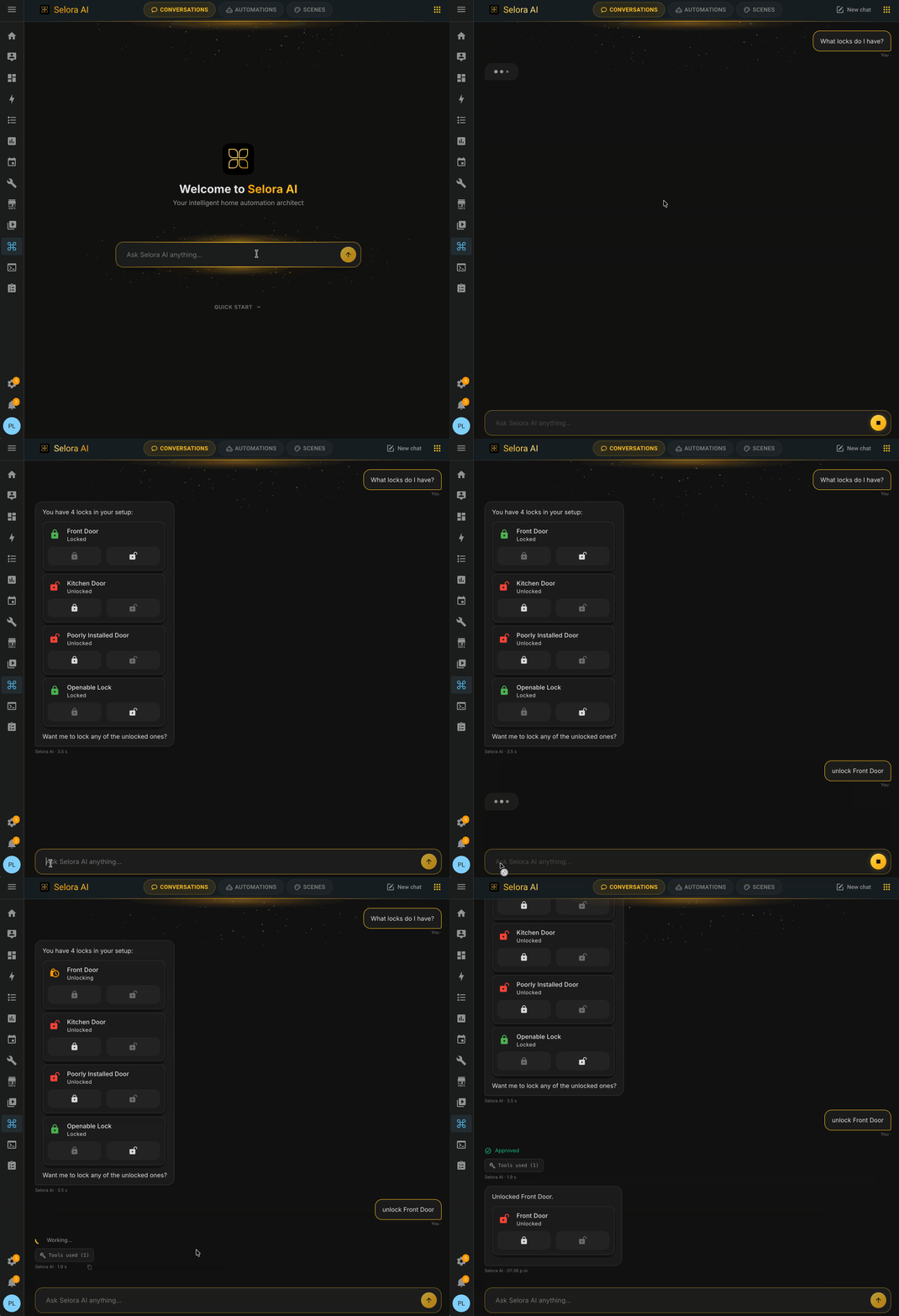
Selora AI v0.9.0 is out. This release tightens the safety story around command execution and lands a batch of chat improvements that make day-to-day use noticeably faster.
Tiered Command Approval
Not every command Selora AI runs carries the same risk. Toggling a lamp is not the same as disarming an alarm or unlocking a door. v0.9.0 gates every command through a risk tier before execution, so low-risk actions run immediately while sensitive ones require explicit confirmation.
Tiering is deterministic and applied server-side, so a prompt-injected message in chat cannot escalate an action past its tier. This is a foundational piece for letting Selora AI act more autonomously without trading away safety.
Chat Composer Upgrades
The composer picked up two features that change how chat feels:
Entity autocomplete
Start typing an entity name in the composer and Selora AI suggests matching devices, areas, and scenes inline. No more guessing at exact entity IDs or pasting them in from the developer tools panel.
Refine-in-chat card, aligned with the automations list
When you refine an automation from chat, the inline card now matches the visual language of the Automations tab. Same layout, same controls, same affordances, so context-switching between chat and the list is seamless.
Accept and Enable from Chat
Previously, accepting a suggested automation from chat created it in a
disabled state, leaving you to flip the toggle yourself. In v0.9.0,
accept enables in place: the automation is created, enabled, and
ready to run in a single step. The [Selora AI] prefix and risk
assessment still apply.
Per-Provider and Per-Model Token Tracking
The Usage panel introduced in v0.8.0 now breaks tokens down by individual provider and model, not just by category. If you run Anthropic for chat, Selora Cloud for suggestions, and a separate provider for background jobs, you can see exactly where each token went and what it cost. Useful for tuning provider routing, and essential for anyone on a pay-as-you-go plan.
Safer Automation Validation
Two fixes worth calling out, because they prevented a class of silent failures:
- Invalid trigger schemas are now rejected before a Home Assistant
reload. Previously, a malformed trigger could land in
automations.yamland break the reload, taking unrelated automations down with it. - Automations referencing unknown
entity_ids are rejected at creation time. No more orphaned automations that look fine in the UI but never fire because the entity does not exist.
Combined with tiered command approval, the integration is meaningfully harder to break, on purpose or by accident.
Persist Active Tab in the URL
The active tab now lives in the URL path, so deep-linking and browser back/forward work the way you expect across Chat, Automations, Scenes, and Usage.
Bug Fixes
- Selora Cloud health checks no longer spawn phantom chat sessions in the backend.
- Chat entity references render as inline tile cards consistent with the rest of the panel.
- Area parentheses no longer leak a sibling-domain tile when an entity shares an area with unrelated devices.
- Auto-scroll to the bottom of chat when new messages arrive.
- Respect the user’s scroll position when scrolling up to read history (no more fighting the auto-scroll).
See the full changelog for the complete list.
What’s Next
Selora AI Local was pulled from v0.9.0 to finalize a few quality issues we were not willing to ship with. It is the focus of the next release, and we will share more as it gets closer.
Update via HACS, or if you already have Selora AI installed, the update will appear in your Home Assistant settings. Selora Hub customers get the update automatically on the next maintenance window.