Selora AI 1.4: Let Any AI Agent Edit Your Home Assistant Dashboards, Safely
Selora AI 1.4 lets ChatGPT, Claude, Grok and other MCP agents add Home Assistant dashboard cards, once a person approves and for a limited time, with every file checked and kept on record. The release also makes each person's chats private, sends health alerts to your phone, and lightens Selora Vision's load on the hub.
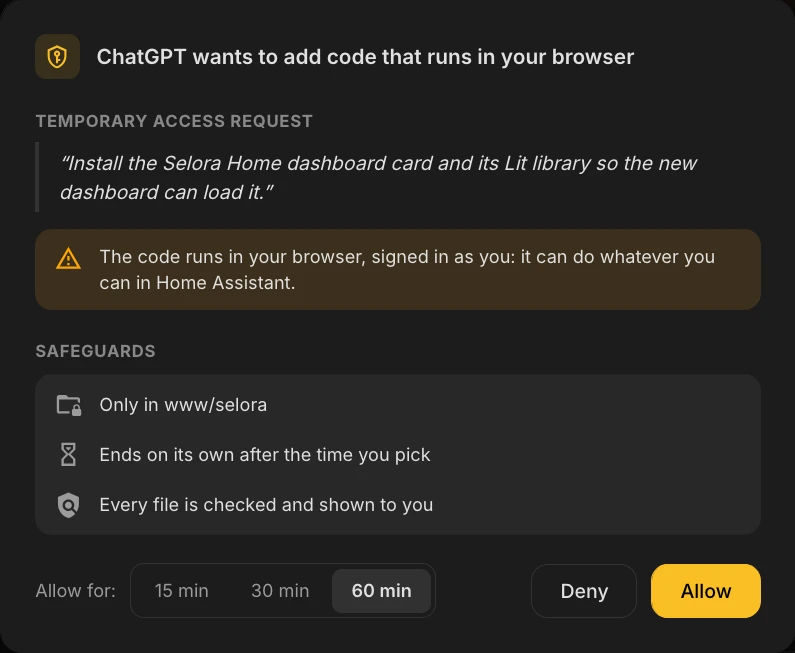
Selora AI 1.4 is about trust. An AI agent like ChatGPT, Claude or Grok, connected over MCP, can now add code to your dashboards, but only after a person says yes, only for a short time, and with every file it writes checked and kept on record.
The release also sends health alerts to your phone, stops a 4K camera from slowing down Selora Vision on the whole hub, and makes each person’s Selora AI chats private.
Let any AI agent add dashboard code, safely
Ask ChatGPT, Claude or Grok to build you a Home Assistant dashboard, and sooner or later it wants to install a custom card. A custom dashboard card is JavaScript. Home Assistant loads it in your browser, signed in as you, so it can do anything you can: unlock the front door, disarm the alarm, read your session. When the person signed in is the homeowner, that is an administrator.
Now picture the agent that writes that card. It reads web pages, files and messages, and any of them can carry a malicious prompt. An agent that was tricked, or a library it downloaded, can write a file that quietly runs as the homeowner every time a dashboard opens.
Other MCP servers for Home Assistant leave this to you. ha-mcp, for example, can write files and dashboard resources when you turn those tools on, and its security policy states that deciding which cards are safe to install is the user’s responsibility, and that defending against prompt injection is the client’s. We think the safeguards belong on the server, where the agent can’t switch them off.
The agent has to ask
selora_request_file_access asks a person to open one folder, www/selora,
for 15, 30 or 60 minutes. The agent says why, and the request shows
exactly what the code will be able to do.
This works the same in every MCP client: ChatGPT, Claude, Claude Code, Cursor, or Grok through its custom connectors. See MCP & Agent Skills to connect yours.
An agent can never grant access to itself. Administrators get a phone and Home Assistant notification, and approving needs a real login, never an access token. An agent holding your token still can’t approve its own request.
Every file is checked
While access is open, the panel header shows the time left, and you can revoke it at any moment. Each file the agent writes is listed with what the code does, found without an AI model, so a crafted file can’t talk its way past the check: network calls and outside addresses, reads of your session, code run from text, admin commands, and the devices it controls, with locks, covers and alarms set apart from everyday lights.
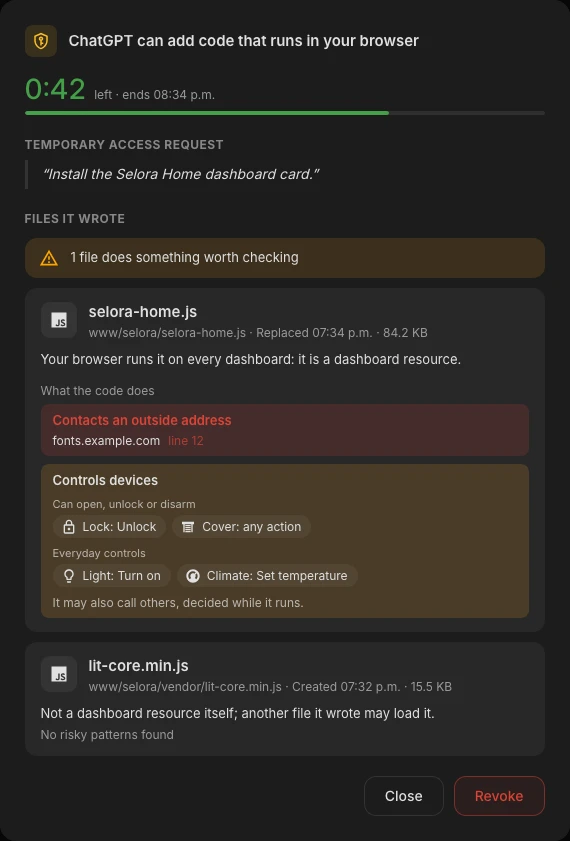
The record stays
When time runs out, the agent loses access, but the findings stay. The agent can’t erase them, and an administrator marks them as reviewed once they have looked.
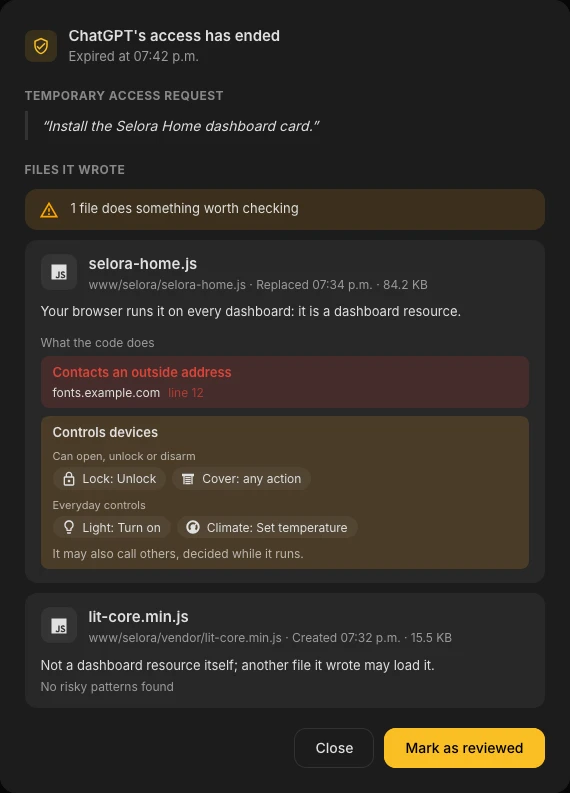
Files written during the window are also reported to Selora Connect. If a home is ever compromised, the installer has a record of what was written, when, and why it was asked for, to work out what happened.
During a Connect support session, the request goes only to the installer, through an approval link in their chat, and access ends with the session.
No shortcut through dashboard tools
The request above is the only way to add code. Selora’s dashboard tools refuse JavaScript, so an agent can’t skip the approval by writing code straight into a dashboard. Code already on your dashboards is kept.
Health problems on your phone
The Health view can now tell
you when it finds a device problem, and take the notification back when
the problem clears. Each card (offline device, low battery, integration
error, unresponsive sensor, unstable device) fires
selora_ai_health_issue_raised and selora_ai_health_issue_cleared
events with a stable issue_id. Use it as the notification tag, and the
clear removes the notification from the phone:
triggers:
  - trigger: event
    event_type: selora_ai_health_issue_raised
    id: raised
  - trigger: event
    event_type: selora_ai_health_issue_cleared
    id: cleared
actions:
  - action: notify.mobile_app_phone
    data:
      title: "{{ trigger.event.data.title }}"
      message: >-
        {{ trigger.event.data.detail if trigger.id == 'raised' else 'clear_notification' }}
      data:
        tag: "{{ trigger.event.data.issue_id }}"
A problem is announced only when a second scan still finds it, and cleared only once it has stayed gone, so a reboot doesn’t wake you up. Problems that already exist when you upgrade are counted, not pushed. For dashboards and conditions, a Health issues sensor counts open problems by kind, and a Health problem binary sensor turns on when there is at least one.
A fairer score
- A TV that’s off isn’t an outage. TVs, speakers and streamers report “unavailable” when switched off. After a day they move to Media devices off, with no cost to the score and no notification. Devices meant to stay on, like voice satellites, wall tablets, locks and alarm panels, still count as offline.
- A small home no longer drops to F over two offline devices. Larger homes score as before.
- Every pending update counts. Each update gets its own card, and Ignore mutes only that one.
Selora Vision uses less of your hub
Object detection doesn’t need 4K. Analysing a full 4K stream keeps a GPU or a processor core busy all the time, and every other camera pays for it.
- New cameras are analysed at 720p at most. Selora Vision measures each camera’s streams before adding it and picks the one closest to 720p, keeping the picture’s shape.
- Uniview cameras added without ONVIF now use their real substream, instead of the 4K main stream twice.
- Health checks each camera. The Health tab reports a camera whose stream doesn’t answer, whose frames the hub drops, that is analysed above 720p, or that keeps a processor core busy, and says what to change.
- Pick the cameras. When Selora offers to have several cameras look for a dog or a car, each camera has a checkbox, and only the ticked ones change.
Recipes made for your devices
The chat home now suggests recipes for devices you own, like a brushing check for an Oral-B toothbrush or a door alert for an LG fridge. A recipe is suggested only when the home has a device for every role it needs, it says which of your devices it’s for, and Open the recipe goes straight to its install wizard. Devices paired in the last two weeks rank a little higher, and recipes you installed or dismissed aren’t suggested again.
Your conversations are private
Until now, every Home Assistant administrator could open, rename or delete everyone’s Selora AI chats. Each conversation now belongs to the person who started it:
- The panel lists only your own conversations. Nobody else can open, continue, rename or delete them.
- An automation’s history no longer previews or links to someone else’s conversation.
- The conversation limit is per person, so one person’s chats never push out another’s.
- Conversations started over MCP are kept apart from the panel’s, even when the agent uses your own token.
Conversations saved before this update belong to the Home Assistant owner, since Selora AI never recorded who started them. In a home with several administrators, those earlier chats now appear only in the owner’s list.
Fixes
- Gemini 3 and 4: chats that used a tool failed with “Function call
is missing a thought_signature”. Tool calls now work on both, and new
Gemini setups default to
gemini-4-hydrogen, which the free tier serves. - Linking Selora Cloud or Connect works when Home Assistant is opened
at
homeassistant.local, not only at its IP address.
What’s next: Selora Vision and dashboards
1.4 finds the cameras that cost your hub the most. The next release fixes them: a camera still sending its full 4K stream to object detection, eating the GPU or CPU around the clock, is the most common problem we see, and Selora Vision will switch it to the right stream for you.
We are also working on dashboard creation, so Selora AI can build a dashboard for your home from what it knows about your rooms and devices.
Compatibility
The minimum Home Assistant version is unchanged at 2025.1.0.
See the full release notes for every change.
Update via HACS, or if you already have Selora AI installed, the update will appear in your Home Assistant settings.