
Selora Support: Reach Our Team From Inside Home Assistant
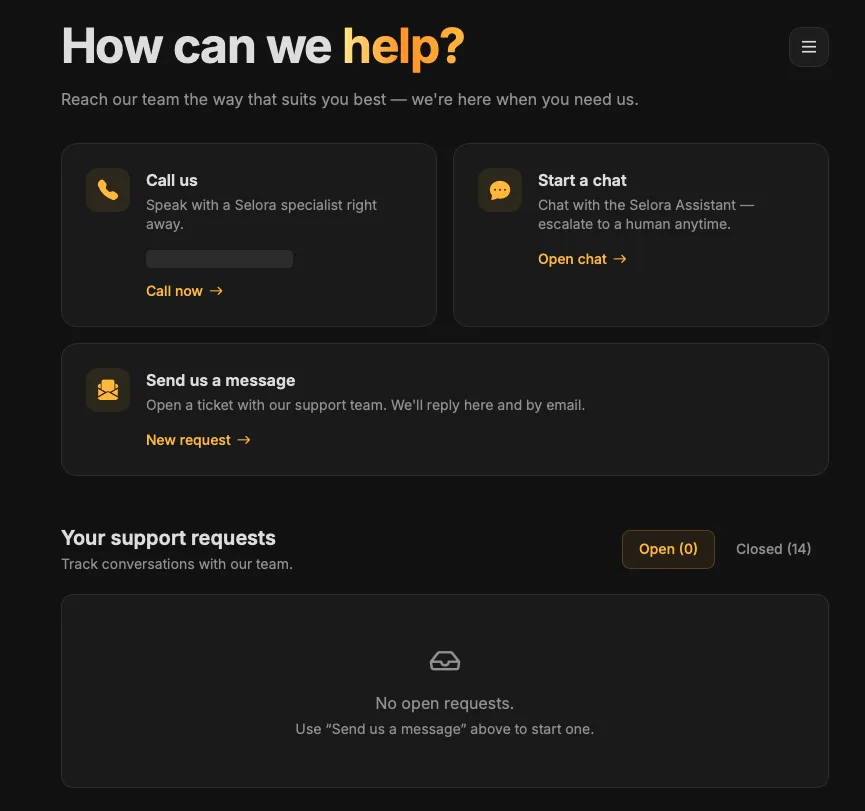
Paid Selora Homes plans now include Selora Support, an app installed automatically in Home Assistant. Call, chat, or open a ticket from the sidebar, and track every conversation with our team in one place.
Getting help with a smart home has always involved a detour. You leave the system that is misbehaving, go find an email address or a portal login, and then spend the first few messages explaining which hub you have and what it is connected to.
We have removed the detour. Every paid Selora Homes plan now includes Selora Support, an app that installs itself in Home Assistant. It puts our team in your sidebar, next to everything else you use.

Three ways in, one place to look
The panel opens on a simple question, and gives you three answers to it.
- Call us. Speak to a Selora specialist right away, without looking up a number.
- Start a chat. Talk to the Selora Assistant, and escalate to a human whenever you want to. There is no gauntlet to get through first.
- Send us a message. Open a ticket with the support team. Replies arrive in the panel and by email, so you can pick whichever you happen to be looking at.
Underneath, Your support requests tracks every conversation you have had with us, split into open and closed. Nothing is buried in a mail thread from four months ago. If you have wondered before whether a request was still being worked on, that question now has a place to be answered.
It installs itself
There is nothing to install. If you are on a paid plan, Selora Support appears in your Home Assistant sidebar on its own.
That matters more than it sounds like it should. The moment you need support is the worst possible moment to be asked to install something.
Help where the problem is
This is the real difference between reaching us from inside Home Assistant and reaching us from a contact form.
You ask for help without leaving the system you were working in. If a scene is not firing, you are two clicks from telling us, still looking at the thing that is broken, rather than composing a description of it from memory in another tab.
Your request history lives with your system too, instead of scattered across your inbox.
What’s included on which plan
Selora Support is installed on every paid plan. The channels inside it follow what your plan includes:
| Channel | Plans |
|---|---|
| Chat and tickets | Essentials, Premium, Estate, Enterprise |
| Phone | Premium, Estate, Enterprise |
Our standard support hours are Monday to Friday, 9:00 AM to 5:00 PM Pacific. Requests outside those hours are picked up the next business day, and critical incidents can trigger an emergency response at any time.
The support page has the full detail on response times and impact levels, and the pricing page covers what each plan includes.
Nothing to do
If you are on a paid plan, look for Selora Support in your Home Assistant sidebar. It is already there.
If you are on the Free plan and want to reach us this way, adding a support plan turns it on.