
Assign Team Members to Locations
File team members at the branch they work from in Selora Connect, and what a home location changes for them.
If your company works out of more than one place — a showroom and a warehouse, or branches in two cities — you can file each person at the location they work from. The Team page then reads as your org chart rather than one long list, and each person’s dashboard opens on their own branch’s work.
Companies with a single location can skip this page. Nothing here changes what anybody can reach.
Add your locations first
Locations live on the Locations page in the Selora Connect sidebar, and they are the same locations homeowners see on your public directory listing: name, address, phone, email and hours of operation.
Adding and closing locations is an owner’s or an admin’s decision. A manager can edit the details of the branch they run, but not open another or close their own.
File somebody at a location
On the Team page, the roster is grouped by location once your company has more than one. People who have not been filed anywhere appear first, under No home location, so the outstanding decisions are at the top rather than buried under the branches.
There are two ways to move somebody, and they do the same thing:
- Drag their row onto the branch you want them at, using the handle on the left of the row.
- Open the ⋮ menu on their row and pick a branch under Move to.
Dragging somebody into No home location clears their branch again.
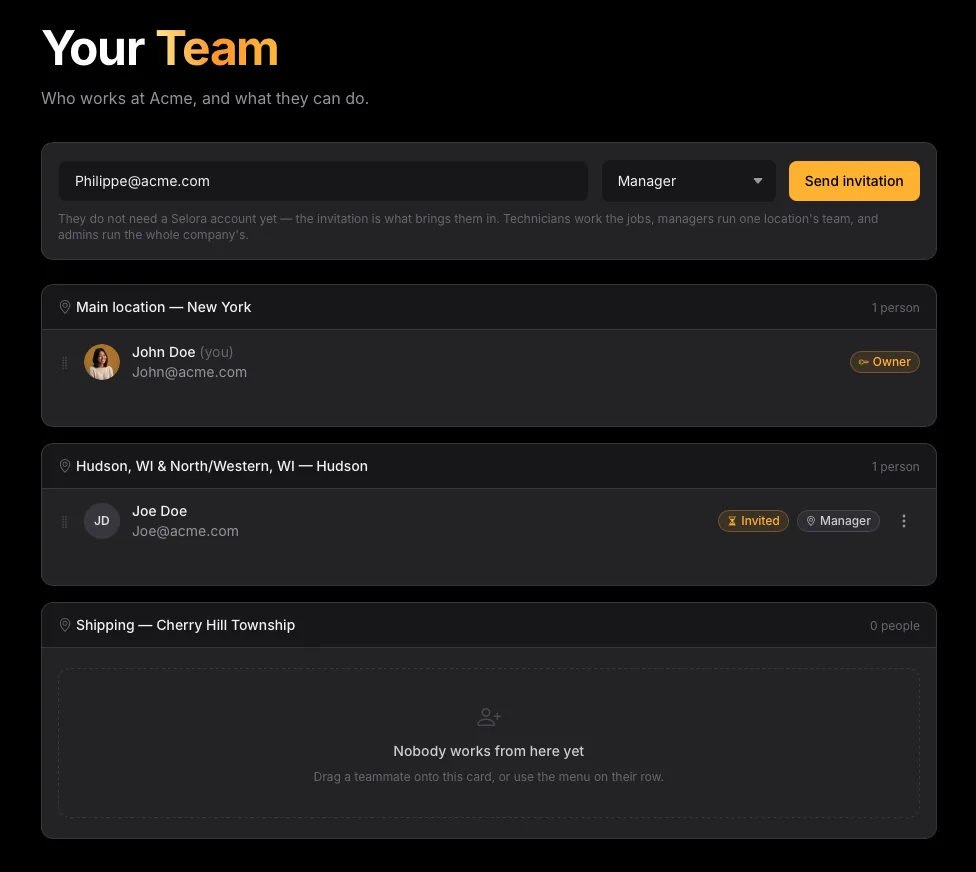
Empty branches stay on the page. A location with nobody at it is usually the reason somebody opened the Team page in the first place, and dropping it would make the roster disagree with your Locations page.
What a home location changes
A home location is a default, not a boundary:
- The dashboard opens on their branch. Somebody filed at a branch sees that branch’s customers, projects and hubs when they sign in. The location switcher above the figures still offers All locations, and every member can use it.
- It gives a manager their authority. A manager’s reach is the people filed at the same branch — that is who they can invite, promote and remove. A manager who has not been filed anywhere manages nobody.
- A manager’s invitations arrive pre-filed. Somebody invited by a manager joins that manager’s location, rather than landing unfiled where their own manager could not reach them.
It does not restrict what anyone can open. Membership is company-wide: a technician filed at one branch can still switch to All locations and work a job at another.
Keeping the two pages in step
The branch headings on the Team page link to that location’s card on the Locations page, and each location card names who runs the branch and how many people work there, linking back to the Team page. If a branch says nobody works there yet, that is the page telling you there is somebody left to file.
Last modified October 30, 2026: feat(devices): add YoLink, its Valve Controller 2 and SpeakerHub (ae3fe19)