
Selora AI
Enable Selora AI on your SeloraBox to get AI-powered automation suggestions and insights directly in Home Assistant.
Search results
Selora AI on SeloraBox
Selora AI adds an intelligent layer to your SeloraBox — personalized automation suggestions, smart insights, and natural language control, all running directly inside Home Assistant.
Who can enable Selora AI?
- Homeowners can toggle Selora AI on or off from their Selora Homes account.
- Installers with access to the installation can also enable or disable it on behalf of the homeowner.
Enabling Selora AI
- Log in to your Selora Homes account .
- Navigate to the settings for your installation.
- Find the Selora AI card and toggle the switch to on.
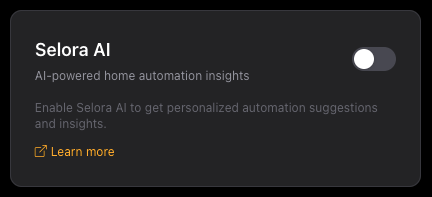
Toggle Selora AI on or off from your account settings.
Once enabled, your SeloraBox will pick up the change within a few minutes and begin the automatic installation process.
What happens after enabling
Your SeloraBox checks for configuration updates every 5 minutes. When it detects that Selora AI has been enabled, it automatically:
- Installs HACS (Home Assistant Community Store), if not already present.
- Installs the Selora AI integration via HACS.
- Restarts Home Assistant to complete the setup.
Confirming the installation
Once the process completes and Home Assistant restarts, you will see a new Selora AI entry in the Home Assistant sidebar.
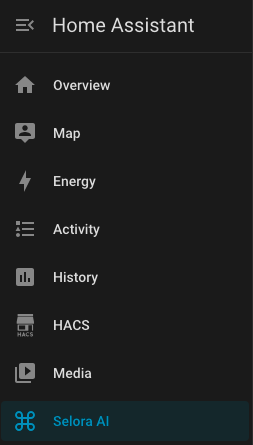
Selora AI appears in the Home Assistant sidebar after installation.
Click on it to open the Selora AI panel and start exploring automation suggestions and insights.
Disabling Selora AI
To disable Selora AI, toggle the switch back to off in your Selora Homes account settings. The SeloraBox will pick up the change on its next configuration check and remove the integration.
Learn more
- Selora AI overview — what Selora AI can do for your home
- Selora AI documentation — full setup, configuration, and privacy details
Last modified April 2, 2026: docs/selora ai auto install (b4b8035)